Foodyx QR Ordering

Order from the table, in multiple languages

Guests scan the QR code at the table, view the menu and place their own order. Where you want it, they also pay straight away on their phone. No app needed.

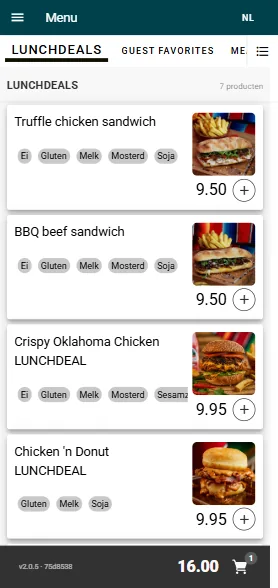
Het bestelscherm op een telefoon, met menucategorieen bovenin, gerechten met allergenen en prijzen eronder, en het besteltotaal onderin.

What QR ordering does for your restaurant

Less pressure on your team

Guests order when they want, without waiting for staff.

Less manual order entry

The order arrives straight on your POS and kitchen display.

In multiple languages

Available in Dutch, English, French and Spanish as standard. With AI you can easily add more languages.

No Foodyx commission or fees per order

You pay a fixed monthly fee for the module. Any payment-provider fees are separate.

How it works

Everything happens on the guest's screen, in a few steps.

  1. The guest scans the QR code
  2. The guest views the menu
  3. The guest places the order
  4. Where you want it, the guest pays straight away on their phone

The phone screen is a screenshot of Foodyx QR Ordering; the QR card next to the phone at the top is a schematic illustration.

Het bestelscherm op een telefoon, met menucategorieen bovenin, gerechten met allergenen en prijzen eronder, en het besteltotaal onderin.

Everything for ordering via QR

At the table or anywhere on site

The QR code is where the guest is sitting, so they can order from there.

Your menu in categories

Guests browse your menu by category.

Allergens per dish

The guest sees the allergens for every dish.

Build their own order

Guests add dishes and put together their own order.

Overview with total

At the bottom of the screen, the guest sees the order total.

Pay by phone

Where you want it, the guest pays straight away on their own phone, for example with Wero / iDEAL or credit card.

Age warning for alcohol

A warning for alcohol and other age-restricted products.

Promotions and daily deals

Promotions from the discount module and daily deals via SmartMenu.

A version for all-you-can-eat

A separate version in which guests order for themselves, round after round.

QR ordering for all-you-can-eat

In an all-you-can-eat restaurant, guests use the QR app to order for themselves, round after round, with no extra hardware on the table.

From QR code to kitchen

A QR order reaches your POS and kitchen display via POSHUB, just like an order taken at the table.

Guest

Scans the QR code with their own phone

QR Ordering

View the menu and order

POSHUB

Connects QR Ordering to Foodyx

POS and kitchen

Process the order

Reporting

Revenue and orders in POS Analytics

See how QR ordering fits your restaurant